I've got the notion to do an occasional Minecraft video series, mainly to show off my mechanism designs and otherwise increase the value (to other people) of all those hours I spend playing. I bought screen recording software just for the purpose.

However, I haven't gotten around to recording an “episode” yet (mainly because I wanted to start with a script to reduce the “um”s, and make sure I have a quiet environment, and that hasn't coincided with enthusiasm for the project). The following video is just a test of recording and uploading to YouTube; there's no voice-over and it's short.

Let me know what you think of this proposed endeavor. I figure to do tours of existing builds with a focus on mechanism, not playing on camera.

Cubes update

Friday, March 9th, 2012 21:46

Some new features in Cubes:

  • An automated test suite. It’s hardly complete coverage, but at least it exists and so can grow. (I ended up going with Jasmine for in-browser testing. I’m not a big fan of the Englishy syntax, but it does the job reasonably well and has niceties like rerunning individual tests and adequate support for asynchronous tests.)
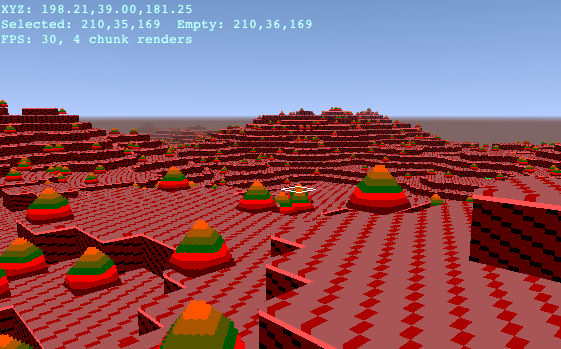
  • Precise collision against rotated blocks: you can now walk up the slope of those funky pyramid blocks, and so on. Stairs, anyone?
  • Performance monitoring widget with fancy graphs. (If you click the “[-]” to hide it, then it won’t waste CPU time updating itself, either.)

[I was asked about Cubes “Where do you think you might take the game play next?” and it turned into this.]

My original motivation for creating Cubes was a combination of the “blocks out of blocks” idea — which itself came from immersion in the graphics of Minecraft — and also dissatisfaction with certain bugs, limitations, and design choices in Minecraft. As a result, I’m not just building a voxel game; I’m building a game that shares what I like about Minecraft.

(What I like about Minecraft, broadly, is survival and engineering — I like building structures and machines to make my virtual life easier.)

Now, creating a Minecraft clone would be unoriginal — not just compared to Minecraft but because Minecraft clones are an entire genre. But I don’t have experience with what little exists of a genre of voxel building games to synthesize my own thing, and I myself am looking for something like Minecraft. What can I do? Here’s what I’ve been trying:

  • Be different.

    Whenever I see an opportunity to do something specifically unlike Minecraft, that doesn’t compromise what I’m trying to do, I take it and see what happens. However, most of these experiments have failed; for example, Cubes originally had a larger-scaled player character, but this turned out bad because it means tunneling and building is 8× more tedious, and it reduces the apparent size of the world. Also, it leads to thinking “OK, add this feature Minecraft has — but (superficially) differently!”

  • Be generic.

    This is my long-term goal, and it is one that ties neatly into the “blocks made of blocks” theme. The characteristics of blocks can be defined by building circuits (programs) inside them. What I’m aiming for is that by creating a blockset (collection of block designs which the player can build with), one is defining the game that can be played, by giving those blocks specific behaviors.

    In this way, I am working towards having a game which can be programmed to emulate Minecraft.

    (I have a working prototype of an importer for Minecraft worlds as well as for Minecraft blocks — that is, turning the terrain.png from a Minecraft texture pack into Cubes' 3D blocks — but I am not going to release that code until and unless I determine that Mojang doesn’t mind my doing so. I still love Minecraft and they deserve my not stepping on their toes that far.)

    However, this means both that Cubes itself needs to be very generic, and that the built-in example uses of such features should feel different from Minecraft.


So, returning to the original topic of “where am I going next”, I need to add the following functionality to the game world:

  • Extend the circuits feature so that there can be blocks that are active and interactive (e.g. opening and closing doors, “physics” like Minecraft falling sand and growing plants).

  • Add moving objects (for vehicles and mobs). I intend to generalize these so that they are worlds in themselves — this will allow large or unique vehicles, and mean that they can be designed using the same game tools.

  • Add some form of resource constraints/conservation laws (as in Minecraft survival mode) — that is, you have to gather stuff to make it into other stuff. I haven’t figured out specifically how I want to do this yet, and this seems particularly tricky to make programmable. One idea that keeps coming to mind is that when you break a block, specific subcubes are “resource cubes” (according to their type in the block world) which you collect, and in order to place a block you need to have the corresponding resources for its type. However, I’m not sure I like the “raw material counter” feel of this.

  • Add player attributes that can be modified (e.g. health) so that e.g. death, or other effects-by-the-world can be supported.

Less grandly, I plan to work on one of these specific technical features soon:

  • Allowing circuit blocks to be rotated to change their connectivity. (Right now, circuit blocks have specific faces — e.g. on a certain one the +X direction is always the output.)
  • Figure out what more circuit primitives I want to add. (Right now, the circuits are definitely not Turing-complete, and not capable of all the effects on the world they should be, but there are also already a lot of different primitives; I may have to invent new block-picking UI just to make them practical.)
  • Add moving objects (bodies) — things which can collide with the terrain as the player does. The current code is entangled with player behavior, and the player does not persist in a world.
  • Add subworld/multiple-world handling — the ability for more than one world (grid of blocks) to be present in the same space. Right now, there are hardwired assumptions that the player is in the single world’s coordinate system.

Another core feature which is currently missing is the ability to design a blockset and then reuse it for multiple worlds. The problem right now is that we're using a simple object-graph serializer, so each world has its own blockset which is modified independently. To fix this, it needs to be possible to save a blockset under a user-visible name, and have individual worlds which reference that blockset; also, the world generator needs to decouple blockset generation from terrain generation. The “persistence” framework which added support for multiple worlds is a step towards this; the main thing I am pondering is what the semantics of these separate-named-persistent objects are and what the user interface for editing them is.

Cubes is a work-in-progress open-source block game (that is, like Minecraft) where the blocks are made out of blocks; in principle, you should be able to build a complete custom block game from scratch simply by building the appropriate block-set, out of blocks. As I mentioned earlier, I'm doing a project on the HCI for this game. I need data.

If you think you might be interested in playing my game, or if you're a current player of a block game (Minecraft, Terraria, FortressCraft, what-ever), please take this survey. I assure you there are no “On a scale from 1 to 5” questions in it.

In September, I wrote of my new project Cubes that “unfortunately, it wasn't an idea for either of my course projects this semester.” Since I have completely failed to find motivation for the course-related project I had planned to do, þreader (a thread-emphasizing feed reader; you can read the project introduction), I have decided to make the best of it and somehow make Cubes into the needed project.

I will therefore be using Cubes as my project for the course CS459 Human-Computer Interaction; the main consequence of this is that I need to actually study the potential users of my system.

So. To recap, Cubes is a block game (like Minecraft) where the blocks are made out of blocks; in principle, you should be able to build a complete custom block game from scratch simply by building the appropriate block-set, out of blocks. If you're a potential user of a game like this, and interested in giving me data (surveys, interviews, etc.), let me know. I will have something for you within the next few days.

Also, the live version of Cubes now supports load/save (either to Local Storage or by cut-and-paste of text (!)), so you can save your work! (I don't promise not to change the world format incompatibly, though.)

On September 6, I had an idea which I couldn't not work on. (Unfortunately, it wasn't an idea for either of my course projects this semester.)

As you may know, in Minecraft, the individual cubical blocks are textured with unsmoothed 16×16 pixel textures. All blocks’ shapes (that aren't just cubes) have lengths in multiples of 1⁄16 block (example, so that the objects have (to some degree) the appearance of being made out of voxels, or smaller cubes. And, people have built giant versions of specific blocks out of colored blocks.

So, what if building blocks out of blocks was actually how the block types were defined?
And that's what I've implemented, in JavaScript/WebGL. The working project name is “Cubes”, because I don't know where it's going enough to give it a better name right now.

The block types you see above were all procedurally generated as placeholders, since I don't have any save/load facility to save manually edited blocks (and I'm not sure about the color scheme of the current set of blocks-you-make-blocks-out-of).

Play (requires WebGL-capable browser; I recommend Chrome).

Source code.

Controls: Standard WASD keys, or arrow keys, and mouselook. The left button adds or removes blocks at the location of the white rectangle cursor; the right button brings up a menu for choosing blocks (the empty square at the top left is the removal tool). The R key enters the world of the selected block; the F key exits.

Update 2011-09-13: I've improved startup; it now tells you more explicitly what went wrong if it fails to load, rather than a blank white screen. I've also added an in-game Help button with controls and browser compatibility info.

I have updated the Minecraft topic at my web site, bringing it up to date with changes, adding many new links, and information about my new world. Also, I didn't previously announce this:

I am running a Minecraft server. I've been running one for a while, but it had a rocky start trying to run on a shared Linode. It now has a dedicated machine (though one which is rather old and running on a home cable connection) and is running 24/7.

The address is: mc.switchb.org

This server runs a copy of my single-player world, updated each day, so changes you make are not persistent (except for your inventory). This is a place to tour, or use for building experiments, not to live in. However, I have attempted to make it suitable for multiplayer use, with direction and instruction signs and multiplayer-capable rail stations (though most of the rail tunnels are single-track).

Feel free to suggest improvements to the facilities, or additional builds.

(Home sweet home.) (Cactus and flower farming.) (Mob tower and access routes.) (Rail hub station.)

(Note for those who have tried the server before: I recently fixed a problem causing new players to spawn nowhere in particular rather than at the spawn station.)

I've added a mini wheat farm to my Minecraft world, just for the sake of building one. If you're interested in looking, it's southwest, with underground access branching off the spawn tunnel.

I've published my Minecraft notes and bookmarks.


This is a slightly different sort of addition to my site; it is a page that is nearly all information and links I've gathered rather than my own work. I've been wanting to write this type of page on several topics for a while now, having them be a place for:

  • material organized in a non-chronological way (unlike this blog).
  • bookmarks, which when in my browser are (a) hardly ever looked at after being created, therefore not benefiting anyone, and (b) are not accessible to me off my own computer.
  • keeping non-bookmark notes and documents in the same organization as bookmarks.

More fuzzily, I hope that giving myself this organizational concept will get me to publish more of anything. Here are some topics I hope to write about in the future:

  • Android apps
  • LaTeX (this would also be publishing existing notes)
  • Webcomics and other serial fiction

I've also thought about adding to various pages of my site automatic indexes of related blog posts (via tags), but I'm not sure it's worth the effort.

Minecraft

Saturday, October 2nd, 2010 01:02

(A view from the observation tower.) (Inside a cave.) (Home sweet home.)

On September 26 I bought Minecraft.

This game is a severe productivity hazard. Unless you count hollowing out virtual mountains as productivity.

(For those that haven't heard about this recent craze, Minecraft in its most interesting variant is basically a sandbox game with resource limitations and enemies. You get an infinite-other-than-coordinate-limits procedurally-generated world (often beautiful) made up of cubical blocks, with resources scattered (and buried) around it. And monsters whenever it's dark (i.e. nighttime and in caves). Then you get to reshape your part of the world by adding and deleting blocks, and crafting objects out of the resources you've dug up. First you build shelter, then you explore caves and build farms, then you build grand castles — or underwater bases — or intricate traps and mazes — whatever. It's very open-ended.)

I've put up an automatic copy of my world as a multiplayer server; just connect to switchb.org in Minecraft Alpha. (With the usual caveat that Alpha multiplayer is glitchy, so the mechanisms won't work as intended.) I may take it down if the load is significant, though.